
今天要解的問題
站上有三個系列:鐵人賽 30 天、接著它每天更新的「Kiwi 的每日筆記」,以及一個精選清單「打造自己的 LLM Wiki」(series 代號 llm-wiki)。最後這個是從寫過的 llm-wiki 文章裡,挑出想自己蓋一個知識庫的人該讀的幾篇。
系列頁原本和其他系列一樣,照日期由舊到新排成一串卡片。文章一多,從架構介紹、多個 session 同時動 vault、skill 範本,一路到儀表板和每月健檢,全混在同一條時間線上。讀者想找「儀表板那幾篇」只能一張一張看標題,實在有夠麻煩且沒效率,因此想先從文章分組,之後可能再想用汽車的意象來表達 llm-wiki。
改完之後長這樣:
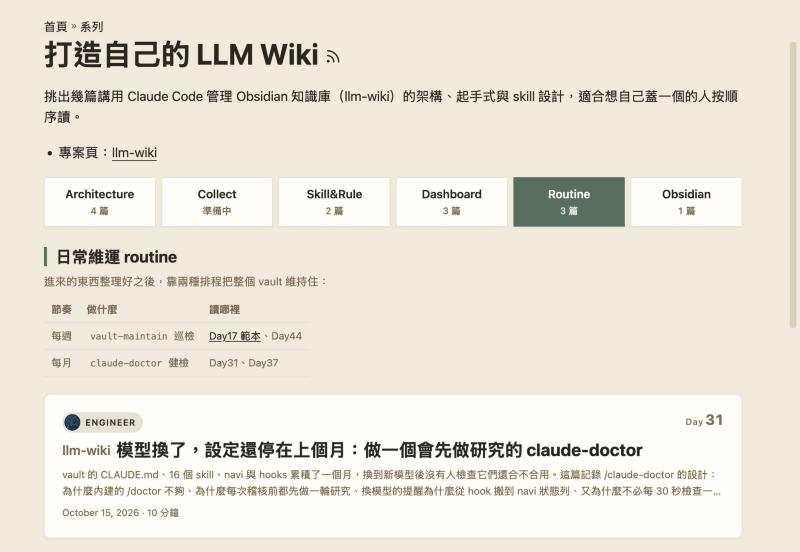
想法與取捨
原本是有「同步」這組
第一版分成五組:架構與起手式、同步、Skill 與規則、儀表板與 mod、健檢。但同步的章節的候選人有「同一個 vault 同時被多台裝置、多個 session 寫入時怎麼不衝突」,只是實際上這個類別後來變化性可能偏少,所以捨棄。
同步轉成「資訊收集」
沒了同步後,想說未來想新增一塊關於資訊收集與資料維護之類的,但目前還沒有,所以就先把空的組建起來而己,還沒有下一步。頂多就是補上「準備中」。
功能分組的文章顯示
- 第一版是小 chips,點擊錨來跳轉到下面,全部文章都在一個頁面。但我覺得太小,然後不喜歡跳轉
- 第二版則大 chips,點擊切換顯示。只是大 chips 會導致變成兩行,不夠一致,讓 chips 不同寬度太明顯
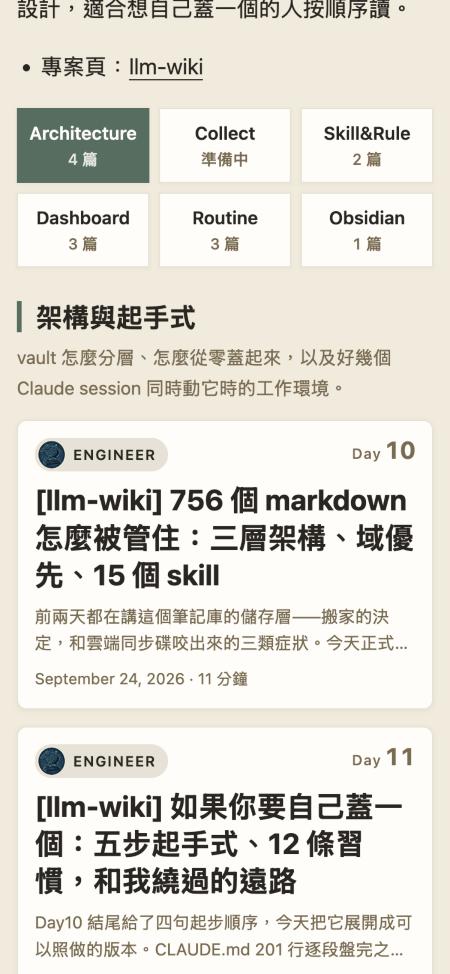
- 第三版則是等寬。但在手機出現極嚴重的 UI 錯誤,因為六個方塊塞不進 375px 的手機,所以會需要橫向捲動才能看到。
- 只好在手機改成三欄兩列,然後在 CLAUDE.md 補上禁止手機需要左右滑,只有程式碼區塊是例外。後來覺得「日常維運 routine」「儀表板與 mod」在方塊裡會折成兩行。
- 調整了 chips 名稱。改成短名:Architecture、Collect、Skill&Rule、Dashboard、Routine、Obsidian。中文全名則留在選取後那組的標題上、滑鼠移上方塊時的提示裡,以及文章下方系列導覽的「系列:打造自己的 LLM Wiki · 日常維運 routine」。
實作
分組寫在系列的 front matter
分組是「系列的編排」,不是文章的屬性,所以寫在 content/series/llm-wiki/_index.md,文章本身不用動:
groups:
  - title: 架構與起手式
    label: Architecture
    intro: vault 怎麼分層、怎麼從零蓋起來,以及好幾個 Claude session 同時動它時的工作環境。
    posts:
      - blogs/engineer/ironman-2026-day10-what-is-llm-wiki
      - blogs/engineer/ironman-2026-day11-claude-md-and-skills
      - blogs/engineer/ironman-2026-day13-multi-session-git
      - blogs/engineer/ironman-2026-day18-worktree-by-default
  - title: 資訊收集
    label: Collect
    intro: |
      東西怎麼進到 vault:隨時捕捉,有東西進來時再觸發整理。
      # ...
    posts: []
title 是中文全名,label 是方塊上的短名,intro 可以寫 Markdown(節奏表就是寫在這裡的表格),posts 是內容路徑。其他系列沒有 groups,系列頁維持原本的日期排序。
一個 partial,同時餵給系列頁和系列導覽
系列頁要知道每組有哪些文章;每篇文章封面下的系列導覽,也要知道自己在哪一組、連回系列頁的哪個分頁。兩邊如果各算一次,分組 id 的公式一改就會對不上。所以收成一個 partial layouts/partials/series-groups.html,用 partialCached 每個系列只算一次:
{{- range .Params.groups }}
  {{- $gp := slice }}
  {{- range .posts }}
    {{- with site.GetPage (printf "/%s" (strings.TrimPrefix "/" .)) }}
      {{- if in $posts . }}{{ $gp = $gp | append . }}{{ end }}
    {{- end }}
  {{- end }}
  {{- if or $gp .intro }}
    {{- /* An empty $gp would be appended as one element and break complement. */}}
    {{- with $gp }}{{ $grouped = $grouped | append . }}{{ end }}
    {{- $base := printf "group-%s" (.id | default (anchorize (.label | default .title))) }}
    {{- $id := $base }}
    {{- range seq 2 20 }}{{ if in $ids $id }}{{ $id = printf "%s-%d" $base . }}{{ end }}{{ end }}
    {{- if ne $id $base }}{{ warnf "series %q: two groups share the id %q; the later one is %q" $.Title $base $id }}{{ end }}
    {{- $ids = $ids | append $id }}
    {{- $aliases := slice }}
    {{- range slice .title .label }}{{ with . }}{{ $aliases = $aliases | append (anchorize .) }}{{ end }}{{ end }}
    {{- $sections = $sections | append (dict "title" .title "label" .label "id" $id "aliases" (uniq $aliases) "intro" .intro "pages" (sort $gp "Date")) }}
  {{- end }}
{{- end }}
{{- with complement $grouped $posts }}
  {{- $id := "group-other" }}
  {{- if in $ids $id }}{{ $id = "group-other-ungrouped" }}{{ end }}
  {{- $sections = $sections | append (dict "title" "其他" "label" "" "id" $id "aliases" (slice "other") "intro" "" "pages" (sort . "Date")) }}
{{- end }}
{{- return $sections }}
幾個細節:
if in $posts .:路徑指到的文章不在系列裡就跳過。「系列是手挑的」落在這裡:決定誰在系列裡的是文章的series:,groups只負責排。if or $gp .intro:有文章或有說明的組才留下,資訊收集靠intro佔位。- 被我挑進系列、卻沒放進任何組的文章,用
complement算出來,收進最後的「其他」,不會消失。 - id 加上
group-前綴(#group-routine)。收尾前再整份掃一次時發現,沒有前綴的話,短名若剛好叫 Top 或 Menu,就會和頁面上既有的id="top"、id="menu"撞名。兩組撞到同一個 id 時,後面那組加-2,build 時印一行警告。 aliases記下舊的 id。分組上線後 id 改過兩次:先是中文標題(#日常維運-routine),然後是短名(#routine),已經分享出去的連結要能繼續打開正確的分頁。
系列導覽那邊只要找出目前這篇在哪一組:
{{- $group := dict }}
{{- if .Params.groups }}
  {{- range partialCached "series-groups.html" . .RelPermalink }}
    {{- if and (not $group) (in .pages $page) }}{{ $group = . }}{{ end }}
  {{- end }}
{{- end }}
{{- with $group }}{{ $posts = .pages }}{{ end }}
找到組之後,導覽就只列這組的文章,連結指向 /series/llm-wiki/#group-routine 這種分頁網址。組超過 10 篇時,一樣只列目前這篇前後 7 篇,和其他長系列同一套規則。
分頁:沒有 JavaScript 時全部列出
模板輸出的是一般的錨點連結和一組一個 <section>,沒有 JavaScript 時就是「點了跳到那組」的舊行為:
<nav class="series-group-toc" aria-label="分組">
  {{- range $sections }}
  <a href="#{{ .id }}" id="tab-{{ .id }}" aria-controls="{{ .id }}"{{ if and .label (ne .label .title) }} title="{{ .title }}"{{ end }}><span class="series-group-name">{{ .label | default .title }}</span><span class="series-group-count">{{ with .pages }}{{ len . }} 篇{{ else }}準備中{{ end }}</span></a>
  {{- end }}
</nav>
站上的 Content-Security-Policy 不允許 inline script(原因見 Day49),所以切換邏輯放在 assets/js/series-tabs.js,緊接在分組後面載入、不加 defer,頁面一出來就只畫出一組。它把連結升級成分頁:
function select(i, focus) {
    tabs.forEach(function (t, j) {
        var on = i === j;
        t.setAttribute('aria-selected', on ? 'true' : 'false');
        t.tabIndex = on ? 0 : -1;
        panels[j].hidden = !on;
    });
    if (focus) tabs[i].focus();
}
function fromHash() {
    var id;
    try {
        id = decodeURIComponent(location.hash.slice(1));
    } catch (e) {
        return -1; /* malformed escape such as #%E0 */
    }
    if (!id) return -1;
    for (var i = 0; i < panels.length; i++) {
        var aliases = (panels[i].getAttribute('data-hash-aliases') || '').split(' ');
        if (panels[i].id === id || aliases.indexOf(id) >= 0) return i;
    }
    return -1;
}
網址的 hash 決定開哪一組,所以系列導覽連過來會直接停在那篇所在的分頁;舊的 id 由 data-hash-aliases 接住,打開後網址會換成新的 id。decodeURIComponent 包在 try 裡,是因為像 #%E0 這種殘缺的 escape 會丟 URIError,沒接住的話分頁只初始化一半,整頁變成六組全開、沒有一顆被選取。另外左右方向鍵、Home、End 可以在分頁間移動。
一排等寬,手機三欄
等寬一行用 grid 的自動欄就好,不必知道有幾組:
.series-group-toc {
    display: grid;
    grid-auto-flow: column;
    grid-auto-columns: minmax(0, 1fr);
    gap: 8px;
    margin-bottom: 28px;
}
grid-auto-flow: column 讓每個方塊各佔一欄,minmax(0, 1fr) 讓每欄一樣寬,長的名字在自己的方塊裡換行,不會把別人擠窄。手機上改成固定三欄、往下排:
@media (max-width: 768px) {
    .series-group-toc {
        grid-auto-flow: row;
        grid-template-columns: repeat(3, minmax(0, 1fr));
    }
    .series-group-toc a { padding: 10px 6px; font-size: 15px; }
}
檢查方式也寫進了 CLAUDE.md:在 375px 寬時,document.documentElement.scrollWidth 要等於視窗寬,而且頁面上沒有任何元素可以左右捲。
踩到的坑
數系列成員,把標籤也數進來
一開始那個 19 篇,是 Claude 用這行數出來的:
grep -rl -E '^\s*-\s*llm-wiki|series:.*llm-wiki' content/blogs --include=index.md
本意是找 series: 底下有 - llm-wiki 的文章,但 front matter 裡 tags: 和 wiki: 的清單也長成 - llm-wiki,只要帶這個標籤就被算進來。所以清單裡出現了 Day33(系列導覽)和 Day40(forward links),而我在系列頁上根本沒看到它們。我問「為什麼會有 day33, day40,我在系列沒看到」,重新只看 series: 那一塊才得到正確的數字:當時系列裡只有 10 篇。YAML 的清單項目不知道自己屬於哪個 key,用一行 regex 去撈只會撈到所有長得一樣的行。
complement:elements must be comparable
加上「空的組也要顯示」之後,build 直接失敗:
execute of template failed: template: _default/list.html:73:9: executing "main" at <complement $grouped $list.RegularPages>: error calling complement: elements must be comparable
原因在 $grouped | append $gp:$gp 是空的 slice 時,append 沒有把它攤平,而是把整個空 slice 當成一個元素塞進 $grouped。之後 complement 拿文章去比對這個 slice 元素,slice 不能比較,就失敗了。修法是只有 $gp 有東西時才 append,也就是上面 partial 裡的 {{ with $gp }}…{{ end }} 和那行註解。
hidden 屬性沒效
分頁的 JavaScript 跑完,hidden 也設上了,畫面上卻還是六組全開。在瀏覽器裡量每個 <section> 的 id、hidden、計算後的 display 和高度:
["架構與起手式", true, "block", 948]
["資訊收集", true, "block", 184]
...
["obsidian", false, "block", 248]
hidden 是對的,但計算後的 display 全是 block:上游有規則把 section 設成 display: block,蓋過了瀏覽器對 [hidden] 的預設 display: none。補一條權重更高的規則:
/* Something upstream sets section { display: block }, which beats [hidden]. */
.series-group[hidden] { display: none; }
補完重新整理還是沒變,因為 hugo server 還在送舊的 CSS bundle(新規則根本不在樣式表裡)。停掉 server、清掉 public/ 和 resources/ 重開之後才生效。這個專案的 CLAUDE.md 早就寫了這件事,這次又踩一次。
走過的分頁,文字看不見
上線後我截了一張圖回報:
被選取後的文字無法看見
截圖裡選取的 Dashboard 是一塊綠色,字幾乎看不見;沒選取的方塊裡,Skill&Rule、Routine、Obsidian 的字也比另外兩顆淡。同一排方塊出現兩種字色,指向的是連結的 :visited 狀態:站上有一條全站規則把點過的連結改成較淡的顏色:
body:not(.dark) a:visited {
    color: var(--ink-soft-warm);
}
它的權重是 0,2,2(兩個 class 層級::not(.dark) 和 :visited),分頁顏色的 .series-group-toc a[aria-selected="true"] 只有 0,2,1,所以點過的分頁一律變成淡棕色,在綠底上就消失了。修法是讓分頁的文字顏色帶上 .series-groups,權重高過它,並且把 :visited 一起寫進去:
.series-groups .series-group-toc a,
.series-groups .series-group-toc a:visited { color: var(--primary); }
.series-groups .series-group-toc a[aria-selected="true"],
.series-groups .series-group-toc a[aria-selected="true"]:visited { color: var(--card-surface); }
驗證時在本機先實際打開三個分頁網址、讓它們變成「點過」,再看畫面:選取的方塊字變回清楚的淺色,點過和沒點過的方塊字色一致。
小結
精選系列現在分成六組,選單是一排等寬方塊:桌機一行、手機三欄兩列,點了切換、不跳轉;還沒文章的「資訊收集」先佔位顯示準備中。分組只寫在系列的 front matter 一處,系列頁和每篇文章下的系列導覽共用同一份計算,所以導覽上的分組連結一定會打開對的分頁,舊的網址也還能用。
這次版面改了好幾輪,大多是我看了畫面後的一句話,從「跳轉改切換」、「換行就沒有一致性」到「手機不准左右滑」。最後一條寫進了專案的 CLAUDE.md,連同 375px 的檢查方式,之後在這個 repo 改版面時都要照著做。