
今天要解的問題
Day26 寫的 navi 管的是 session 閒著的時候:輸入框上下、側邊面板,讓我看 vault 的狀態。但 Claude 真正在跑的時候,畫面上最顯眼的是另一個東西:輸入框上方那條會動的 spinner,例如 Sauteing… (12s, 300 tokens),或桌面版的 Running a second parallel ~7s wait 22 秒。
這一列告訴我的資訊很少。它在想、在叫工具、還是在打字?同時跑了幾個工具?派出去的 subagent 各自在做什麼?token 燒得多快?這些都看不出來。所以我直接問:能不能加一個 mod,修改 Claude 在 thinking 或執行時的那一列。
想法與取捨
先查能改什麼
mod 的 ui.render 能接手的元件裡,就有一個叫 Spinner,正是那條會動的列,terminal 和桌面版都會觸發。它帶的 props 只有四個:
| 欄位 | 內容 |
|---|---|
word | 這次抽到的動詞(Sauteing);桌面版是當下步驟的描述 |
message / suffix | 有特殊狀態時取代 word 的文字、結尾的 … |
mode | requesting/thinking/responding/tool-input/tool-use |
秒數和 token 數不在 props 裡,引擎自己保管。所以一旦我整列自己畫,原本的秒數和 token 會一起消失,得自己算回來。這是後面所有設計的前提。
我想要什麼:更細、合併、看得到增長
第一輪我列的方向是換詞庫、依 mode 分色、帶 vault 資訊這類小改。我回的是三個問題:
- mode 可以更細緻嗎?
- 不同的 running task 可以合在一起嗎?
- token 使用數也能抓嗎?能看到它的增長嗎?
查下去,這三個都做得到,資料要從別的事件拿:
- 更細:
turn.step會把模型回應一塊一塊串流給 hook,thinking、text、tool(模型開始要叫哪個工具)、input(工具參數的 JSON 逐段進來)都分得出來,還帶這是這個 turn 的第幾個 step - 合併:
tool.call在工具真的執行時觸發,await next(e)回來就代表跑完。用它維護一份「正在跑」的清單,平行的工具自然都在裡面;subagent 的呼叫帶agentId,可以歸到各自那一行 - 增長:見下一節,這裡有一半是估的
我選的是「全放,獨立 mod,subagent 列出各自在跑什麼」。
獨立 mod 是 Claude 建議的:thinking-line 和 navi 沒有共用的資料,放在一起只會讓 navi 出問題時兩個一起壞。分開的話,哪一個怪掉就單獨關掉那一個。
「全放」之後又拿掉三個
第一版確實全放:step、經過秒數、輸出 token 與速度、輸入 token 與 cache 命中、ctx 使用率、模型名與 effort。看過畫面之後,我說不需要知道 model name 跟 effort,ctx 也不用。
理由很單純:這三個我自己本來就沒有想知道,放上去只會把寶貴的文字框佔掉。拿掉後,$.session.usage() 的呼叫也一起刪了。
step 只有序號,沒有總數
我也問過:知不知道總共有幾個 step?答案是不知道。turn.step 帶的 index 是「現在第幾個」,但總共要幾個是模型邊做邊決定的:它看完工具結果才決定要不要再叫一次工具。事前沒有任何地方有這個數字,所以只能顯示 step 3,做不出 step 3/7 這種進度條。
token:一半實值,一半估算
API 回報的 usage(input、output、cache read、cache creation)只出現在每個 step 的最後一塊,也就是 stop chunk。串流途中沒有數字可拿。
所以分兩段:串流中按收到的字數估,每個 step 結束時把估計值歸零、換成實值。速度則是用最近 3 秒的總輸出量差除以時間,主迴圈和 subagent 一起算。數字在 step 中途會是近似值,每個 step 結束時會被校正。
實作
mod 放在 llm-wiki 的 .claude/skills/thinking-line/,跟 navi 一樣由專案的 skills 資料夾自動載入,兩台機器共用。整體資料流:
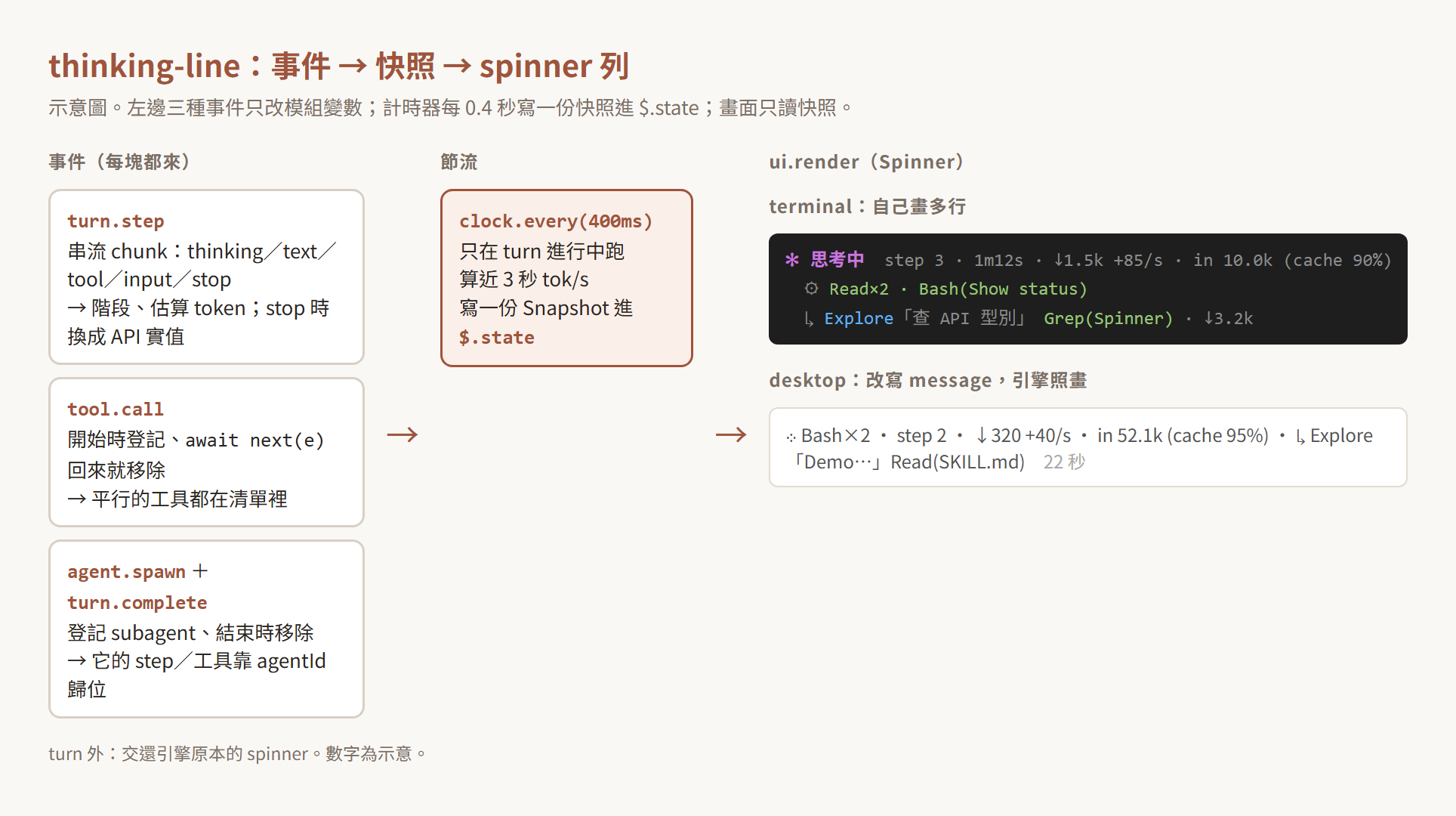
估算 token
/** 粗估 token:CJK 一字約 1 token,其餘約 4 字元 1 token。 */
export function estimateTokens(text: string): number {
  let cjk = 0
  for (const ch of text) if (ch.codePointAt(0)! >= 0x2e80) cjk++
  return cjk + (text.length - cjk) / 4
}
我的 vault 中英混雜,只用「4 字元 1 token」會把中文算得太少,所以 CJK 字元另外算。這只是過渡用的數字,step 結束就會被實值取代,粗一點沒關係。
在串流裡觀察,但不改它
turn.step 是串流事件,hook 要寫成 async generator,而且每一塊都要原封不動 yield 回去,不然 Claude 就收不到回應了。這裡需要的是「看」,所以手動迭代,最後把 next(e) 的回傳值交回去:
on('turn.step', async function* ($, e, next) {
  const live = S.live
  const agent = e.agentId !== undefined ? agents.get(e.agentId) : undefined
  const isMain = e.agentId === undefined
  if (!isMain && !agent) return yield* next(e) // 引擎自己的 fork(壓縮、記憶)不列
  // ...
  const it = next(e)
  let r = await it.next()
  while (!r.done) {
    const c: TurnStepChunk = r.value
    switch (c.kind) {
      case 'thinking':
        setPhase('thinking')
        addLive(estimateTokens(c.text))
        break
      // ... text、tool、input
      case 'stop': {
        const u = c.usage
        if (agent) {
          // ... subagent 分支同理,只記 output token
        } else {
          live.outLive = 0
          if (u) {
            live.outDone += u.output_tokens
            live.inTokens = u.input_tokens + u.cache_read_input_tokens + u.cache_creation_input_tokens
            live.cacheRead = u.cache_read_input_tokens
          }
          live.phase = c.stopReason === 'tool_use' ? 'tool-use' : 'idle'
        }
        break
      }
    }
    yield c
    r = await it.next()
  }
  return r.value
})
開頭那行過濾很重要。引擎自己也會在背景跑模型(壓縮 context、整理記憶),它們的 step 也帶 agentId,但不是我派出去的 subagent。所以只追蹤在 agent.spawn 登記過的 id,其他直接放行。
stop 時 stopReason === 'tool_use' 代表模型這一步是要叫工具,階段就先切到「執行中」,不用等 tool.call 進來。
平行工具:一個 Map 加一個 finally
const owner = e.agentId !== undefined ? agents.get(e.agentId) : undefined
const bag = owner ? owner.tools : e.agentId === undefined && e.tool !== 'Agent' ? live.tools : undefined
主迴圈的工具進 live.tools,subagent 的工具進它自己的 tools。Agent 工具本身排除,因為 subagent 已經有自己那一行,再列一次 Agent(...) 就重複了。登記之後 try { return await next(e) } finally { bag?.delete(id) },工具不管成功或失敗都會從清單移除。畫的時候同名的合併,兩個 Read 就顯示 Read×2。
chunk 很密:事件只改變數,計時器寫快照
串流 chunk 一秒可以來很多塊。如果每塊都寫 $.state,每塊都會觸發重畫。所以事件 hook 只改模組裡的變數,turn 進行中由計時器每 0.4 秒寫一份完整快照:
async function flush($: EngineInterface, S: Store) {
  const now = await $.clock.now()
  const live = S.live
  live.frame += 1
  S.samples.push({ t: now, total: totalOut(S) })
  S.samples = S.samples.filter(s => now - s.t <= RATE_WINDOW_MS)
  const first = S.samples[0]!
  const last = S.samples[S.samples.length - 1]!
  const dt = (last.t - first.t) / 1000
  const rate = dt > 0.5 ? Math.max(0, (last.total - first.total) / dt) : 0
  // ... 組 agentRows 與 Snapshot
  await update($, snap, () => value)
}
計時器只在 turn.start 開、turn.complete 關。整列自己畫之後,引擎的秒數不再出現,所以就算 token 沒動,經過時間也得持續重畫,這個計時器同時負責這件事。frame 拿來輪流換開頭的符號,取代引擎原本那個會動的圖示。
快照放 $.state,不放模組變數。理由是 render hook 讀 $.state 時會自動訂閱,寫入後只有讀它的畫面會重畫,不用自己呼叫 invalidate。
兩種畫法
terminal 畫多行 tree:第一行是階段加統計,第二行是平行工具,下面每個 subagent 一行。桌面版不畫 tree,改寫 props:
// 桌面版的 spinner 是單行一列,tree 常被換回引擎的:改寫 message 讓引擎照畫
// (秒數引擎自己會顯示,這裡不重複)
if (e.surface !== 'terminal') {
  const agentsText = s.agents.map(a => `↳ ${a.type}「${short(a.description, 16)}」${phaseText(a.phase, '', a.tools)}`)
  const line = [head, ...meta.filter(m => m !== fmtElapsed(s.now - s.startedAt)), ...agentsText].join(' · ')
  return next({ ...e, props: { ...e.props, message: line, suffix: '' } })
}
message 是 Spinner 本來就有的「特殊狀態時取代 word」欄位,引擎會用它自己那一列照畫,秒數也還在,所以這裡把經過時間濾掉不重複。為什麼要分兩種,見下一段。
不在 turn 中時,hook 直接 return next(e),用回引擎原本的 spinner。
踩到的坑
傳 $ 給輔助函式,被 validate 擋下
第一版把 flush、讀 context 的函式寫在 register 裡面當閉包。claude plugin validate 直接報錯:
compiled line 188 `await refreshContext($);`: $ is passed to "refreshContext", which is not a function declared at the top of this file (a function declaration, or a const bound to one); $ is followed nowhere else; $ is always spelled $.noun.event(...) at the call site
engine 會靜態分析 $ 被拿去做什麼,所以 $ 只能傳給檔案頂層宣告的函式。改法是把這些函式搬到頂層,原本靠閉包共用的狀態收成一個 Store 物件一起傳:flush($, S)。
測試裡沒有引擎畫 spinner
claude plugin test 第一次跑,兩個 UI 測試都掛:
HooksError: $.ui.mount: no implementation for ui.render

nothing beneath the plugins answers ui.render: a test answers it with on('ui.render', ...)
測試環境裡,plugin 底下沒有真的引擎。mod 在 turn 外會 next(e) 交還引擎,但測試裡「引擎」不存在。要在測試裡自己墊一個最底層的 hook,代替引擎畫 spinner:
const stubEngineSpinner = (on: On) =>
  on('ui.render', { component: 'Spinner' }, ($, e) => {
    const { Text } = $.ui.resolve(e)
    return <Text>ENGINE {e.props.message ?? e.props.word}</Text>
  })
順帶一提,這個 stub 一開始是寫成有型別標註的共用常數,tsc 報 TS2590: Expression produces a union type that is too complex to represent.。ui.render 的 hook 型別是所有元件、所有介面的 union,一個常數很難同時配上;包成接收 on 的函式、在呼叫處推導型別就過了。
後來畫出 message 的那行 stub,正好讓同一組斷言可以同時檢查 terminal 的 tree 和桌面版改寫後的文字。
桌面版「有時候沒有」
測試全綠、mod 也載入了,我在桌面 app 實際跑一輪:一個 subagent 加兩個平行的 Bash。結果我看到的是這個:
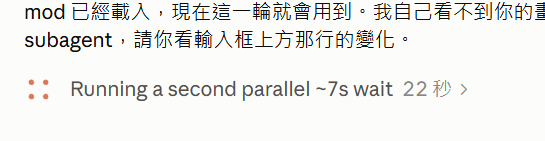
這是引擎原本的畫法:工具描述加秒數。我的回報是「有時候沒有」。
型別說明寫的是「A hook rewrites the first three, or draws a tree in place of all of it」,tree 理論上可以。但桌面版的 spinner 是單行的一列,我的 tree 是多行的 Box flexDirection="column"。Claude 的推測是多行在桌面版沒被採用,引擎就畫回自己的。這只是推測,沒有去 debug log 確認確切原因。
改法是桌面版不畫 tree,改寫 message,讓引擎用它自己的一列畫我給的文字。再跑一輪「列出 Inbox」,這次那一列出現了 mod 的內容。terminal 維持多行 tree。
之後在別的 session 裡,桌面版那一列長這樣:

開頭是正在執行的工具,後面接 step 序號、輸出 token、輸入 token 與 cache 命中率,最後的經過時間仍然是引擎自己畫的。整段太長,被截掉了一部分。
小結
thinking-line 做完了。執行中那一列現在看得到這些:
- 細分的階段:送出、思考、回覆、準備哪個工具、執行中
- step 序號
- 平行的工具合成一段
- 每個 subagent 在跑什麼
- 本 turn 的輸出 token、近 3 秒的速度、輸入 token 與 cache 命中率
terminal 版是多行 tree,階段各有顏色,每個 subagent 一行並附它的 token;桌面版是這些內容用 · 串成的單行純文字,沒有顏色。
改動共 6 個檔案、+615/−1 行,含 3 個測試,validate、tsc、plugin test 都過。
還沒驗證的有兩塊:
- terminal 的多行版本只在測試裡畫過,還沒在真的 terminal 看過
- Mac 那台還沒跑過
最後老實說:這次比較像是測試看看「執行中那一列能改到什麼程度」。資訊是都拿得到了,但現在的樣子我覺得挺醜的。能不能留下來、要怎麼排才好看,之後再說。
本文同步發表於 kiwi-walk.com:https://kiwi-walk.com/blogs/engineer/ironman-2026-day28-thinking-line/